ATS Resume Examples
Plain-text resume examples built to survive an applicant tracking system intact.
An applicant tracking system does not see a page. It sees a stream of text, extracted in whatever order its parser walks the file, and then stored as fields in a database a recruiter searches. Anything on your resume that carries meaning visually rather than textually is either flattened, reordered or dropped on the way in. Columns interleave into unreadable alternating lines. Tables collapse. Text placed in a header or footer region is frequently discarded outright. Icons carry nothing at all, so a phone symbol beside your number becomes a number with no label.
An ATS resume removes all of it: one column, conventional section headings, no graphics, and no layout that depends on where something sits on the page. Every example below is the same content a designed resume would carry, with the presentation layer taken off. That is the part worth internalising, because it is where most advice on this subject goes wrong. A plain resume is not a worse resume, and it is not a concession. It is the same argument, written so the machine that reads it first can actually read it.
Send this version wherever an application form asks you to upload a file. Keep a designed version for the recruiter who asks for one directly, for a referral, and for the interview loop, where a human is definitely the reader.
Examples
Real ats resume examples you can use as a starting point.
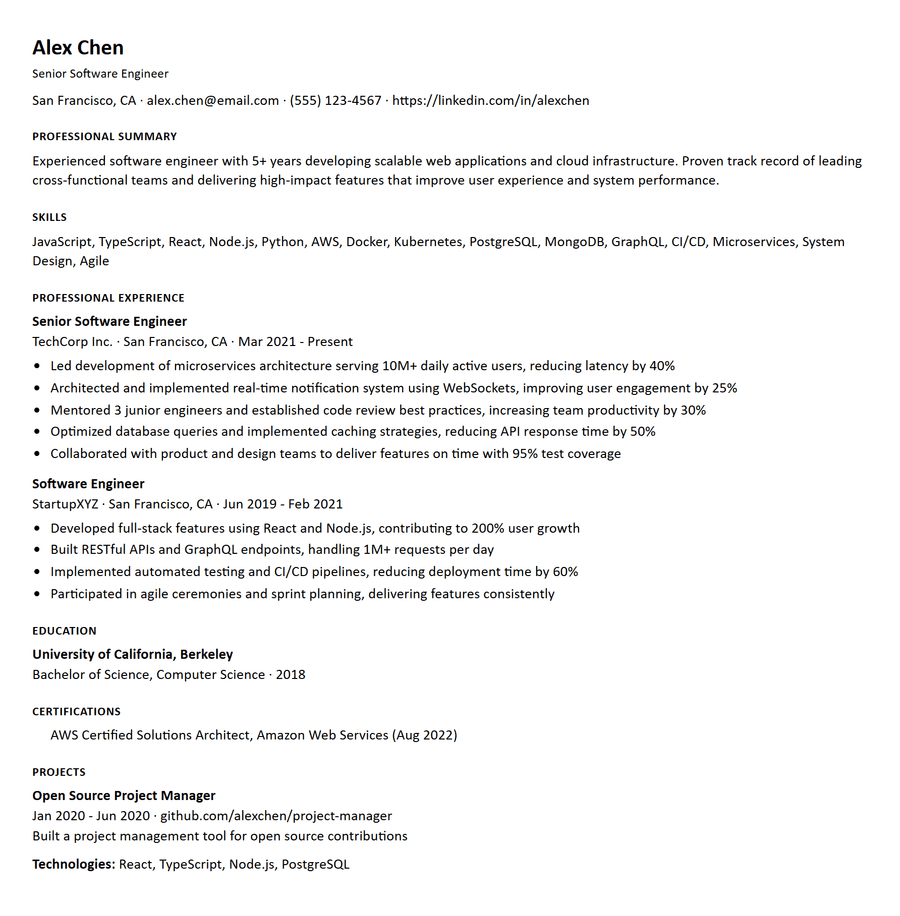
ATS Software Engineer
ATSATS-optimized resume for software engineering roles. Plain text format with standard sections and keyword-rich content.
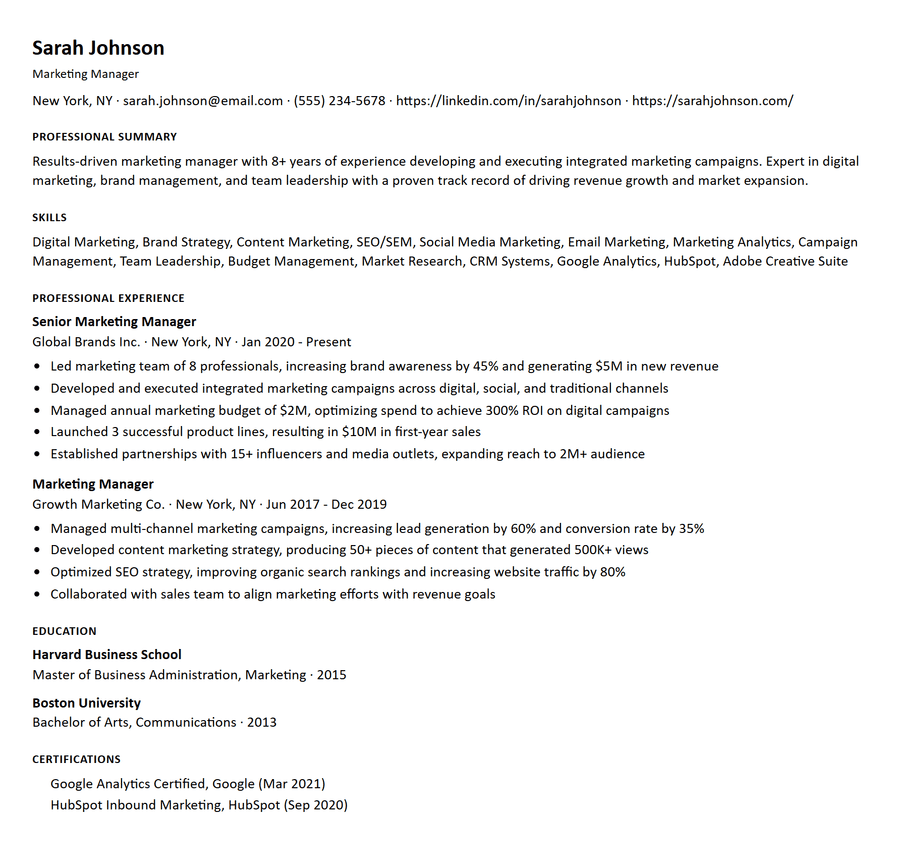
ATS Marketing Manager
ATSATS-friendly resume format for marketing professionals. Clean, simple layout that passes through applicant tracking systems.
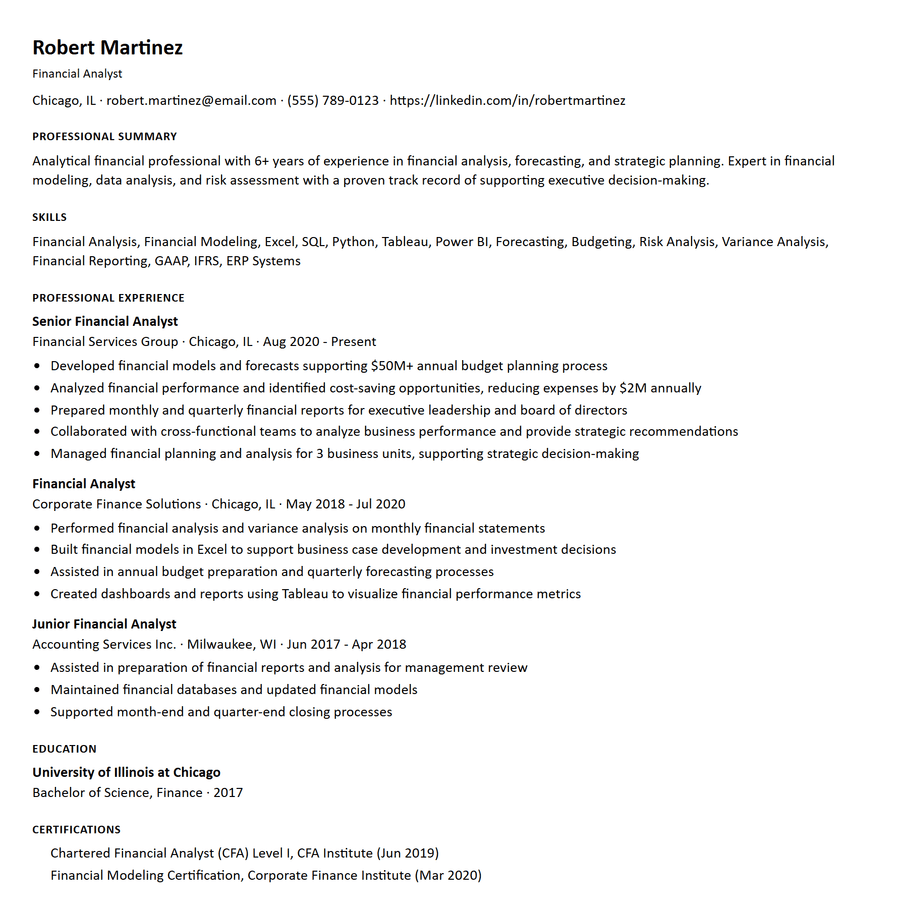
ATS Financial Analyst
ATSPlain-text ATS resume for finance roles. Optimized for applicant tracking systems with standard section headings.
Tips for the ATS template
Small choices that make this template work harder for you.
Use the headings a parser already knows
Experience, Education, Skills, Certifications. A parser matches against a vocabulary it was built with, so "Where I Have Worked" maps to nothing and the roles beneath it may never be filed as employment history.
Put keywords in the bullets, not just the list
A skills list is the weakest place to claim a tool, both for a parser weighting term frequency and for a human deciding whether you have used it. Name it in the role where you actually used it.
Never use tables or columns
Both are the classic parse failure. A two-column layout interleaves into alternating fragments; a table of skills flattens into a run of words with no structure left.
Write dates one way, everywhere
Ranges written three ways on one page produce a garbled employment history, and an unexplained gap generated by a parsing error is indistinguishable from a real one. Pick "Jan 2021 - Present" and use it for every role.
Write links out as URLs
A hyperlink whose destination lives only in the file metadata reaches the reviewer as the word "GitHub" and nothing else. Write the address so it survives as text.
Keep contact details in the body
Text in a header or footer region is one of the most commonly dropped elements. Put your name, email, phone and location in the first lines of the document itself.
What the parser does to each part of your resume
It helps to know which elements survive extraction and which do not, because the failures are specific rather than general. Body text in a single column survives intact, and so does anything that is genuinely text: your name, your bullets, your dates, a URL written out in full. This is most of a well-built resume, which is why plain formats work so reliably.
Multi-column layouts are the first thing to break. A parser reading a page left to right across the full width produces alternating fragments of your sidebar and your job history, so a skills column beside an experience column becomes a shuffled mixture of both. A table is the same failure in miniature: the grid that made a skills matrix readable to you collapses into a run of words with no rows or columns left to give them meaning.
Text placed in a document header or footer region is frequently discarded outright, and this is the one that costs people interviews rather than points. Putting your name, email and phone number in the header of a Word document is a common and reasonable design choice, and it is also how a candidate becomes uncontactable in a database. Keep contact details in the first lines of the document body.
Icons and images carry no text at all. An envelope symbol beside an address leaves an address with no label, and a skill rendered as a five-star rating graphic leaves nothing whatsoever. A certification shown as a badge image is, to the system reading it, a certification you do not have.
What an ATS actually is, and what it does not do
An applicant tracking system is a database with a parser attached. It extracts text from your file, maps it into structured fields, and stores the result. A recruiter then searches and filters that database by skill, title, location or years of experience.
It follows that an ATS does not usually reject anyone. It is a filing system. What costs you the application is a recruiter running a search your record does not match, or your record being filed incorrectly because the file did not parse. Both are worth fixing and they are different problems: the first is a vocabulary problem, the second is a formatting one.
It also follows that no applicant tracking system shows candidates a score. There is no number inside Workday, Taleo or Greenhouse that an applicant can raise. Any ATS score you have been shown is a model of how well your resume matches a particular job, built by whoever showed it to you. That is a perfectly reasonable thing to build, as long as they say how it works.
How to check your own file in two minutes
Open your PDF, select all, copy, and paste it into a plain text editor. What you see there is roughly what a parser sees, and it is a better test than most tools because it has no opinion to sell you.
Check five things. Is the reading order right, or do columns interleave? Did your contact details survive, or were they in a header region? Are all the dates present, in one consistent format? Did the skills section become a readable list or an unpunctuated run of words? Are your links visible as addresses rather than as the word "portfolio"?
If that pasted text reads as a coherent document, the record built from it will be coherent too, and you can move on to whether it contains the right terms. If it does not, no amount of keyword work will help, because the keywords are landing in the wrong fields or not landing at all.
Keep two versions
The most useful habit in this whole subject is refusing the choice. Maintain the plain version and a designed version of the same content, and send whichever suits the channel: the plain file to every application form, the designed one to a recruiter who emails you, to a referral, and into the interview loop where a person is definitely the reader.
Once the content is written, keeping both costs almost nothing. What it buys is the end of a false trade-off that a lot of advice on this subject is built on, between a resume that a machine can read and a resume a human wants to.
Real ATS scores, not just examples
Every score below is computed by our published deterministic scorer against a real posting for that role. Nothing here is asserted.
Frequently asked questions
What is an ATS resume?
A resume written as plain, single-column text with conventional section headings, so applicant tracking software extracts every field correctly instead of dropping or reordering parts of it. The content is the same as any other resume; only the presentation is removed.
Does an ATS reject my resume automatically?
Usually not. An applicant tracking system is a database with a parser attached, not a gatekeeper with a rejection threshold. What loses you the application is a recruiter running a search your record does not match, or your record being filed incorrectly because the file did not parse. That is why format matters: not to satisfy a filter, but to be findable.
What is a good ATS score?
It depends whose score it is, because no applicant tracking system publishes one. Any ATS score you are shown is a model of how well your resume matches a specific job, built by whoever shows it to you. Resumedit publishes its full method, including the exact weight each component carries, in the help centre article on understanding ATS scores.
Do I always need an ATS resume?
For an online application to a mid-size or large employer, yes. For a direct referral, a recruiter conversation or a small company that reads email attachments, a designed resume is fine and often better. Keeping both versions costs nothing.
Will an ATS resume look plain to a recruiter?
It is intentionally simple, and in most fields that is neutral to positive. Finance, law and academia already expect a plain document. In design and marketing, where visual judgement is part of what is being assessed, send the ATS version to the application form and a designed version or portfolio link to the human.
Should I use white text to hide keywords?
No. It is detectable, and being caught reads as dishonesty rather than cleverness. It also does not work the way people hope: a resume that matches on keywords and nothing else still fails the moment a person reads it, and keyword matching is capped in any well-built scoring model precisely because it is gameable.
How many keywords should I include?
As many as are genuinely true of you and genuinely named in the posting. There is no target count worth chasing. A term you cannot speak to for two minutes in an interview costs more than it gains.
Should I send a PDF or a Word document?
Send whichever the application form asks for, and if it does not say, send a PDF. Modern parsers read both, and a PDF has the advantage of arriving looking the way you left it. The old advice to always send .docx dates from a period when PDF extraction was genuinely unreliable, and it is no longer the deciding factor. What still matters is what is inside the file: a PDF exported from a two-column layout parses just as badly as a Word document with the same layout, and a clean single-column document parses well in either format. Never send a resume as an image, a scan, or a PDF that is a picture of text, because there is no text in it to extract at all.
Ready to build your resume?
Start with one of these examples or open a blank template. Free to try, no credit card required.